50 Music Timing Tool Silhouette Vector Bundle
Essential Visual Tools for Rhythm, Tempo, and Design
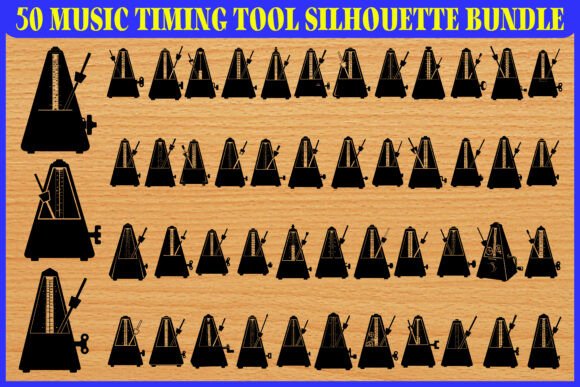
The 50 Music Timing Tool Silhouette Vector Bundle offers a versatile and visually cohesive collection of metronome and timing tool illustrations. Each silhouette is designed with a clean, bold aesthetic, making them ideal for a wide range of creative and educational applications. Whether you're a music educator, graphic designer, or app developer, this bundle provides scalable, customizable assets that bring clarity and professionalism to your projects.
Why This Vector Set Stands Out
Unlike generic icon sets, these silhouettes are specifically crafted to represent rhythm, tempo, and musical timing with precision and style. The bold outlines and minimal details ensure readability at any size, while the vector format guarantees crisp quality across digital and print media. With 50 unique variations, you have plenty of visual diversity to work with, whether you're designing a music app, a classroom worksheet, or branded merchandise.
Creative Applications Across Industries
This silhouette bundle isn’t limited to one use case. Its flexibility allows it to serve multiple creative and functional roles across different platforms and audiences. Here are some practical and imaginative ways to apply the set:
- Music Education Materials: Use the silhouettes in textbooks, lesson plans, and practice sheets to visually reinforce rhythm and tempo concepts. Their clean style makes them ideal for visual learners.
- UI and App Design: Integrate these icons into music-related apps or websites as intuitive interface elements. Whether for a metronome feature or a practice timer, the icons maintain clarity at small sizes on screens.
- Presentation and Infographics: Enhance slideshows or data visuals about music theory, performance techniques, or industry trends with consistent, professional icons.
- Merchandise Design: From t-shirts to stickers and posters, these bold silhouettes work well as standalone graphics or part of a larger design theme centered around rhythm and timing.
- Branding and Logos: Incorporate elements from the set into music studio branding, lesson websites, or event logos to communicate professionalism and musical precision.
Designing for Different Audiences
Each user will approach this bundle with a different goal. Here's how various professionals can adapt the silhouettes to their specific needs:
- Musicians and Educators: Use the icons in handouts, flashcards, or digital lessons to help students understand tempo markings, rhythmic patterns, and practice techniques. Pair each silhouette with corresponding audio or visual cues for interactive learning.
- Graphic Designers: Incorporate the icons into posters, album covers, or social media templates. Their minimalist style works well in both modern and classic design schemes, especially when color-matched to your brand palette.
- App Developers: Use the icons as scalable UI elements in mobile or desktop music applications. Their vector format ensures crisp display across screen sizes and resolutions without the need for multiple image assets.
- Entrepreneurs and Marketers: Feature these icons in promotional materials for music schools, online courses, or instrument brands. They help establish a visual identity that's both professional and approachable.
Practical Tips for Effective Use
To get the most out of the 50 Music Timing Tool Silhouette Vector set, consider the following design and workflow strategies:
- Customize Thoughtfully: While the silhouettes are black by default, they can be easily recolored to match your brand or project palette. Use consistent color treatments to maintain visual harmony across your materials.
- Scale with Confidence: Since the files are vector-based, you can resize them for everything from mobile app icons to large-format posters without any loss of quality. This versatility makes them perfect for multi-format projects.
- Organize Your Files: When working with multiple silhouettes, keep your design files clean by labeling layers and grouping similar icons. This helps streamline revisions and future reuse.
- Combine with Other Assets: These silhouettes pair well with other design elements like musical notes, staff lines, or waveform graphics. Just be sure to balance complexity so your visuals remain clear and focused.
Project Ideas to Spark Inspiration
Here are a few real-world examples of how you might apply this bundle creatively:
- Interactive Learning App: Create a music theory app where each silhouette represents a different tempo or rhythm exercise. Users tap on the icon to hear a metronome beat or play a corresponding audio example.
- Printable Practice Tracker: Design a weekly practice worksheet with icons marking different exercises. Students can check off completed sections, making the process visually engaging and rewarding.
- Studio Branding Kit: Use a combination of silhouettes to create a consistent visual identity across business cards, signage, and website headers for a music studio or recording space.
- Social Media Content: Build a content calendar around music education tips, each post featuring a relevant silhouette to reinforce the topic. For example, a post about tempo could include a metronome icon in a bold color to draw attention.
Final Thoughts
The 50 Music Timing Tool Silhouette Vector Bundle is more than just an icon set—it’s a versatile toolkit for anyone working in music education, design, or creative branding. Its clean, scalable visuals make it a practical asset for both digital and print use, while the variety of silhouettes ensures you can find the right image for every context. Whether you're designing a presentation, developing an app, or creating educational materials, this bundle helps you communicate rhythm, tempo, and musical precision with clarity and style.